SmartSchool OS — AI-Powered School Operating SystemSmartSchool OS — AI-Powered School Operating System
FeaturesPricingAboutDocsSupport
LoginStart free
SmartSchool OS — AI-Powered School Operating SystemSmartSchool OS — AI-Powered School Operating System

One AI-powered operating system for school reports, exams, analytics, and growth — replacing spreadsheet chaos with clarity.

Start free

Product

  • Features
  • Pricing
  • Documentation

Resources

  • Get started
  • Support
  • About

Legal

  • Privacy Policy
  • Terms of Service

© 2026 SmartSchool OS. All rights reserved.

Powered by Globull

Documentation/Calendar & events

Calendar & events

Create and manage your school's academic calendar — schedule events, mark holidays, plan exam periods, and keep everyone informed.
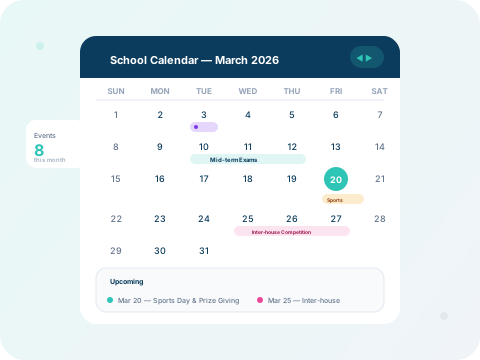
SmartSchool OS monthly calendar with events, exams, and holidays marked

What you'll learn:

1. Create events
2. Academic dates
3. Mark holidays
4. Notify parents

Step 1 — Create events

Click any date on the calendar to create a new event. Enter the title, description, event type (academic, sports, meeting, holiday), and set the date range. Events are colour-coded by type.

Calendar event creation dialog with title, type selector, and date range picker
Create a new event — choose the type, dates, and description.

Step 2 — Set up the academic calendar

Use the Academic Calendar view to define term start/end dates, exam windows, and school holidays for the entire year. Navigate between months and years with the built-in controls.
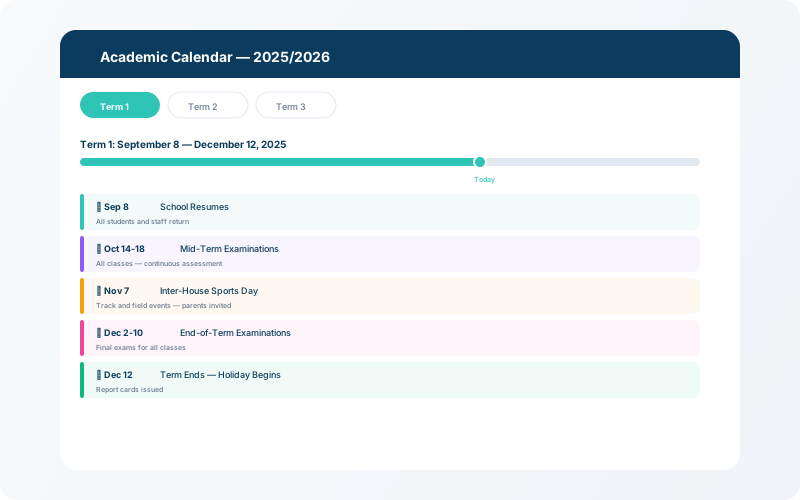
Academic calendar setup showing term dates, exam periods, and holiday blocks
Define term dates, exam windows, and holidays for the full academic year.

Step 3 — Event notifications

When an event is created or updated, all relevant stakeholders (teachers, parents, students) receive push notifications and in-app alerts. This ensures everyone stays informed about upcoming activities.
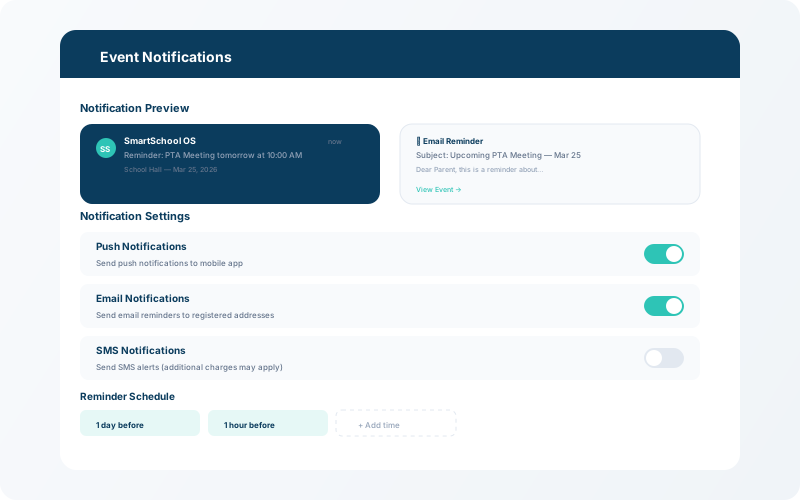

Calendar event notification preview showing push and in-app notification for parents
Automatic notifications — parents and teachers are alerted about upcoming events.