SmartSchool OS — AI-Powered School Operating SystemSmartSchool OS — AI-Powered School Operating System
FeaturesPricingAboutDocsSupport
LoginStart free
SmartSchool OS — AI-Powered School Operating SystemSmartSchool OS — AI-Powered School Operating System

One AI-powered operating system for school reports, exams, analytics, and growth — replacing spreadsheet chaos with clarity.

Start free

Product

  • Features
  • Pricing
  • Documentation

Resources

  • Get started
  • Support
  • About

Legal

  • Privacy Policy
  • Terms of Service

© 2026 SmartSchool OS. All rights reserved.

Powered by Globull

Documentation/Getting started

Configuring terms and sessions

Sessions and terms are the backbone of SmartSchool OS. Every exam, attendance record, and report card is scoped to a specific term within a session.
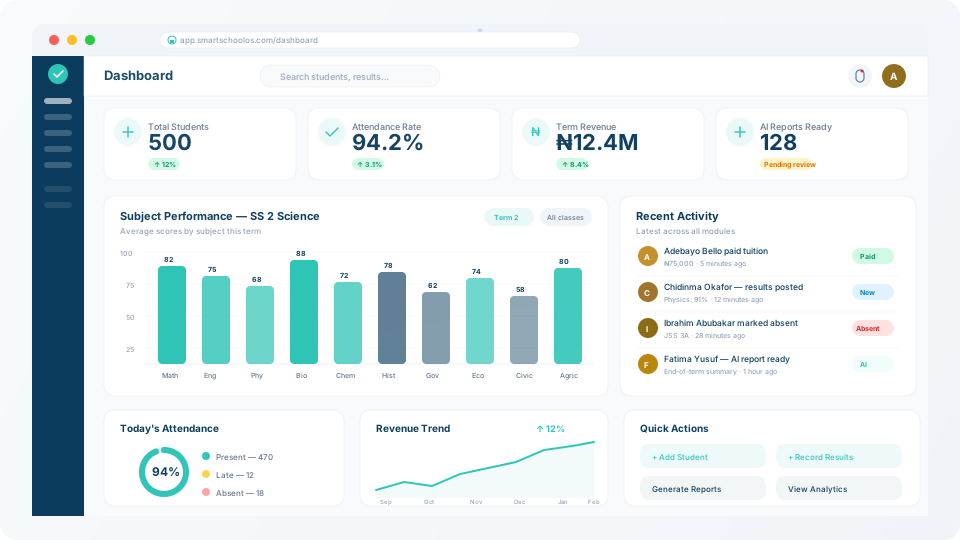
SmartSchool OS dashboard showing term-scoped analytics

Term structure

Define how many terms your academic year has — typically 3 for Nigerian schools. Each term has a label, start date, and end date. All exam and attendance records are automatically scoped to the active term.
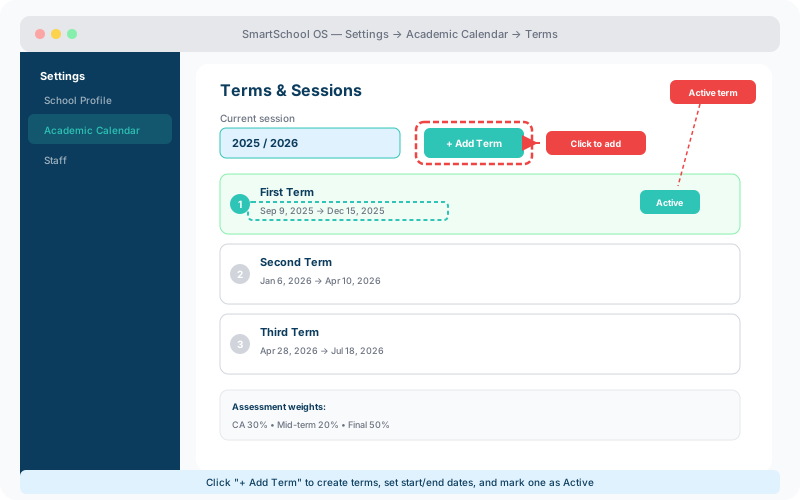
  1. 1Go to Settings → Academic Calendar → Terms.
  2. 2Click Add Term and enter the name (e.g. "First Term").
  3. 3Set the start and end dates for the term.
  4. 4Repeat for each term in your academic year.
Term configuration screen showing three terms with dates and an active badge, plus Add Term button
The Terms screen — click Add Term, set dates for each term, then mark the current one as Active.

Sessions (academic years)

A session represents the full academic year (e.g. 2025/2026). You can create future sessions in advance and pre-configure their term structure so transitions are seamless.

Current session

The active session that all dashboards and modules reference.

Future sessions

Pre-create next year's structure. Terms, subjects, and class promotions are ready before day one.

Assessment windows

Within each term, define assessment types — continuous assessments (CA), mid-term tests, and final examinations. Each type can carry a different weight in grade calculations:

Assessment typeTypical weightExample
Continuous Assessment30%Weekly quizzes, homework
Mid-term Test20%Half-term examination
Final Examination50%End-of-term exam

💡 Tip

Weights are fully configurable per-subject. Some schools give more weight to practicals in Science subjects — SmartSchool OS supports this.

Switching the active term

Only one term is active at a time. When you activate a new term:

  • Previous term data is locked — scores and attendance can no longer be edited.
  • The dashboard switches to the new reporting period.
  • Teachers see their new class assignments and pending tasks.
  • Report cards for the previous term remain accessible read-only.

⚠️ Important

Make sure all scores are finalised and report cards generated before switching terms. Locked term data requires admin override to modify.


← Inviting staffNext: Student enrolment →