SmartSchool OS — AI-Powered School Operating SystemSmartSchool OS — AI-Powered School Operating System
FeaturesPricingAboutDocsSupport
LoginStart free
SmartSchool OS — AI-Powered School Operating SystemSmartSchool OS — AI-Powered School Operating System

One AI-powered operating system for school reports, exams, analytics, and growth — replacing spreadsheet chaos with clarity.

Start free

Product

  • Features
  • Pricing
  • Documentation

Resources

  • Get started
  • Support
  • About

Legal

  • Privacy Policy
  • Terms of Service

© 2026 SmartSchool OS. All rights reserved.

Powered by Globull

Documentation/Student management

Student enrolment

Add students to your workspace individually or in bulk. Once enrolled, students appear across attendance, exams, and reporting modules instantly.
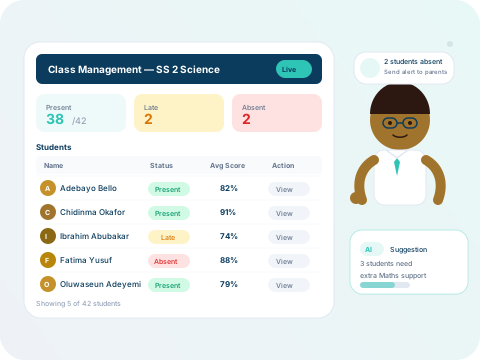
SmartSchool OS student management dashboard

Adding students

Register a new student in under 30 seconds:
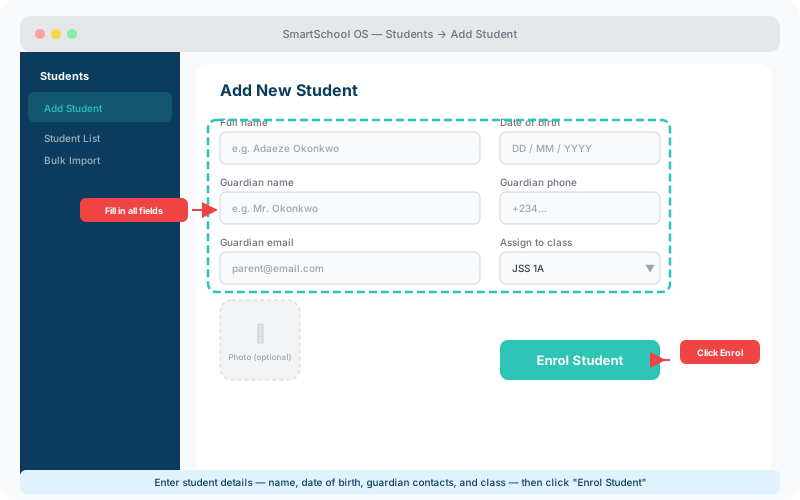
  1. 1Navigate to Students → Add Student.
  2. 2Enter the student’s full name and date of birth.
  3. 3Add guardian/parent contact details (phone and email).
  4. 4Select the class to assign the student to.
  5. 5Click Enrol — the student is live across all modules.
Add Student form with name, date of birth, guardian contacts, class selector, and Enrol button highlighted
The Add Student form — fill in all details, choose a class, then click Enrol Student.

Bulk enrolment

For schools enrolling hundreds of students, upload a CSV or Excel file with columns for name, date of birth, guardian contact, and class.

Validation

Entries are checked for missing fields and invalid formats before import.

Duplicate detection

Existing students are flagged so you don’t create duplicate records.

Preview

Review the full import list before committing — nothing is saved until you confirm.

💡 Tip

Download the sample CSV template from the bulk import page to ensure your columns match the expected format.

Student profiles

Each student has a rich profile page with:

  • Academic history — grades and report cards across all terms.
  • Attendance records — daily presence/absence with trend charts.
  • Behavioural notes — teacher-added remarks on conduct.
  • Parent/guardian contacts — phone, email, and portal link status.

Transfer and withdrawal

When students leave your institution, SmartSchool OS handles the transition cleanly:

  • Transfer records can be exported as a complete PDF package.
  • Withdrawn students are archived — never deleted.
  • Archived students can be restored instantly if they re-enrol.

⚠️ Important

Student data is never permanently deleted. Even after withdrawal, records are retained for audit and compliance purposes.


← Configuring termsNext: Class assignment →