Keep parents in the loop with a dedicated portal for report cards, attendance summaries, school announcements, and direct communication.
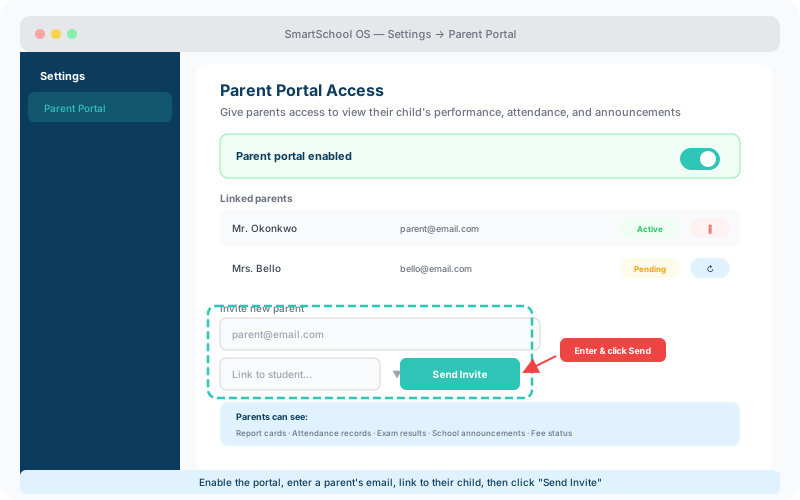
Parents receive an invitation link tied to their child's profile. The onboarding flow is simple:
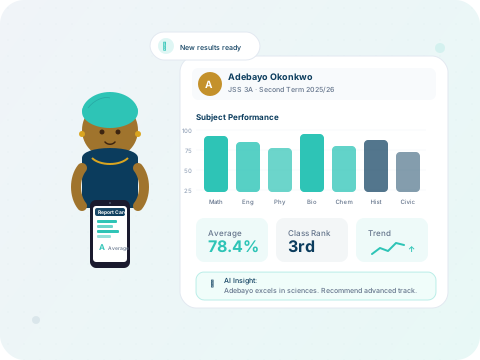
When a report card is published, parents are notified instantly and can view or download the PDF from their portal. Access is restricted to their own children — parents never see other students' data.
Instant notifications
Push notification and email when a new report is published.
PDF download
Parents can download report cards for offline viewing or printing.
Term history
All past terms’ report cards are accessible in one timeline.
Secure access
Each parent only sees their own child’s academic records.
The parent portal includes an announcement feed where schools can post updates, event reminders, fee deadlines, and policy changes. All announcements are visible to every parent linked to the school.
💡 Tip
Use announcements for fee payment reminders — it's the most effective channel for reaching parents who may miss individual messages.
Parents with multiple children enrolled see a child switcher in their dashboard. One account, one login — full visibility across all their children's records, attendance, and report cards.
⚠️ Note
If a parent already has an account for one child, simply link additional children from the student profile page — no new invitation needed.