Enter scores per student, upload results in bulk, review submissions, and lock grades for report card generation.
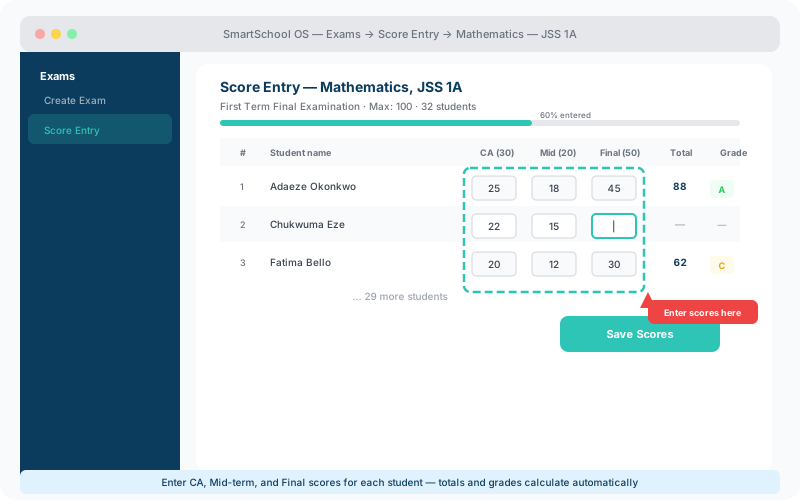
Teachers navigate to their assigned class and exam, then enter scores in a spreadsheet-style grid:
For teachers managing large classes, download a pre-formatted spreadsheet, fill in scores offline, then re-upload:
Download template
Pre-populated with student names and IDs — just fill in scores.
ID matching
Students are matched by ID automatically. Mismatches are flagged.
Preview before save
Review all scores in a grid before committing the upload.
Before scores are finalised, admins can review submissions on the review dashboard:
Once all scores are verified, admins lock the exam. Locked scores cannot be edited without an admin override, ensuring data integrity for report card generation.
⚠️ Important
Always lock scores before generating report cards. Unlocked scores may change after reports are printed, causing inconsistencies.