SmartSchool OS — AI-Powered School Operating SystemSmartSchool OS — AI-Powered School Operating System
FeaturesPricingAboutDocsSupport
LoginStart free
SmartSchool OS — AI-Powered School Operating SystemSmartSchool OS — AI-Powered School Operating System

One AI-powered operating system for school reports, exams, analytics, and growth — replacing spreadsheet chaos with clarity.

Start free

Product

  • Features
  • Pricing
  • Documentation

Resources

  • Get started
  • Support
  • About

Legal

  • Privacy Policy
  • Terms of Service

© 2026 SmartSchool OS. All rights reserved.

Powered by Globull

Documentation/Analytics and billing

Dashboard overview

Your command centre. The dashboard surfaces the metrics that matter most — student count, attendance rate, billing status, storage usage, and upcoming exams.
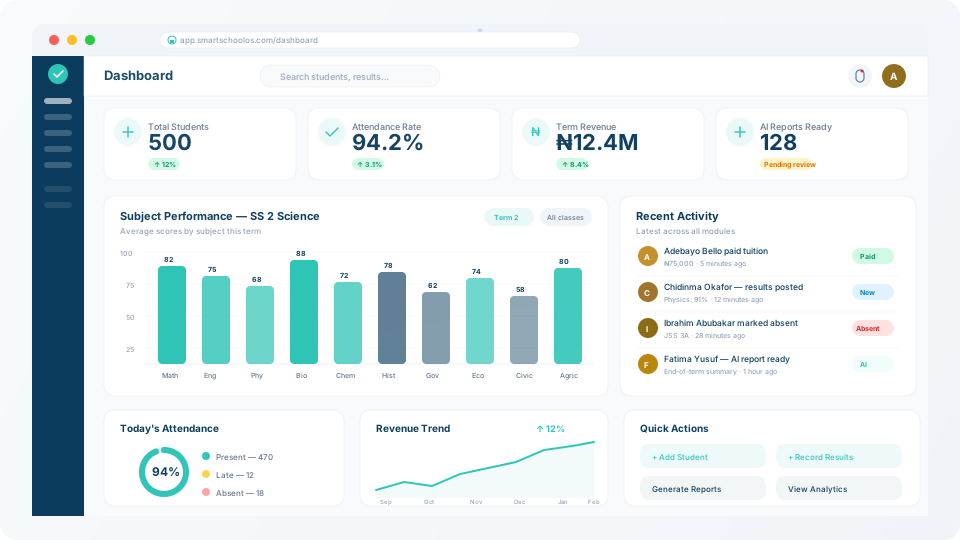
SmartSchool OS admin dashboard with key metrics

Key metrics at a glance

The top row of your dashboard shows real-time KPI cards:

500+

Total students

Enrolled across all classes

94%

Attendance rate

Current term average

3

Upcoming exams

Scheduled this week

2.4 GB

Storage used

Of 10 GB plan limit
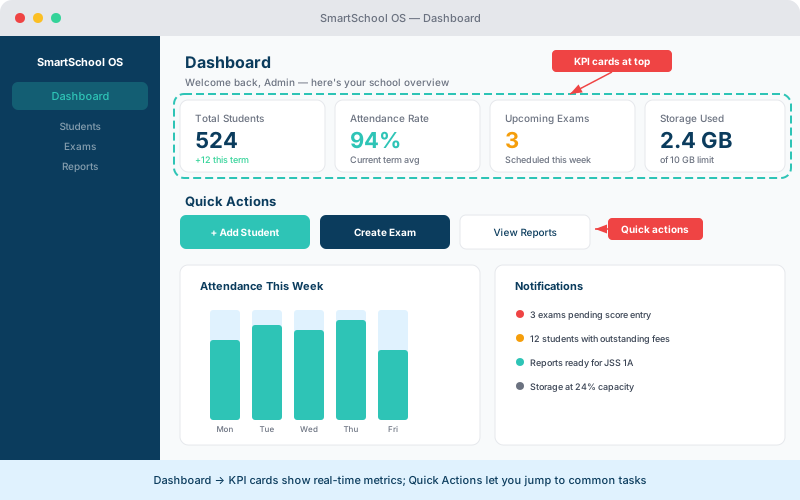
Admin dashboard showing KPI cards, attendance chart, quick actions and notifications
Your dashboard shows real-time KPI cards, quick actions, and notifications at a glance.

Role-based views

The dashboard adapts to each user's role:

🛡️

Admin

  • Financial overview & revenue
  • School-wide attendance
  • Storage & AI credit usage
  • Staff activity summary

📚

Teacher

  • Assigned classes
  • Pending score entries
  • Attendance marking
  • Report generation tasks

👨‍👩‍👧

Parent

  • Child performance summary
  • Recent report cards
  • Attendance records
  • School announcements

Quick actions

Common tasks are accessible directly from dashboard cards, reducing clicks to get things done:

  • Mark attendance — one-click access to today’s roster.
  • Enter scores — jump to the active exam for your class.
  • Generate reports — trigger AI comment generation or PDF export.
  • View payments — check outstanding fees and send reminders.

Notification centre

The bell icon in the top bar shows real-time alerts for pending score entries, storage warnings, AI credit updates, new announcements, and system updates. Notifications are also delivered via email for critical events.

💡 Tip

Configure notification preferences in Settings → Notifications. You can mute non-critical alerts while keeping important ones like storage limits active.


← Report card templatesNext: Revenue analytics →