Track total revenue, monitor fee collection rates, identify payment trends, and export financial reports for your board or accountant.
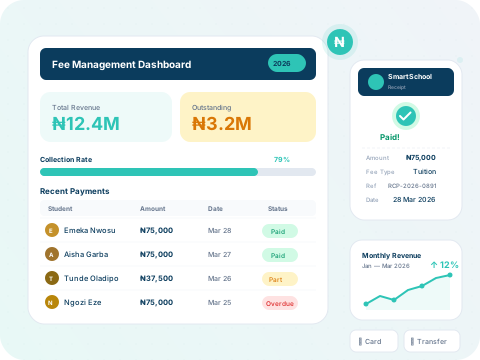
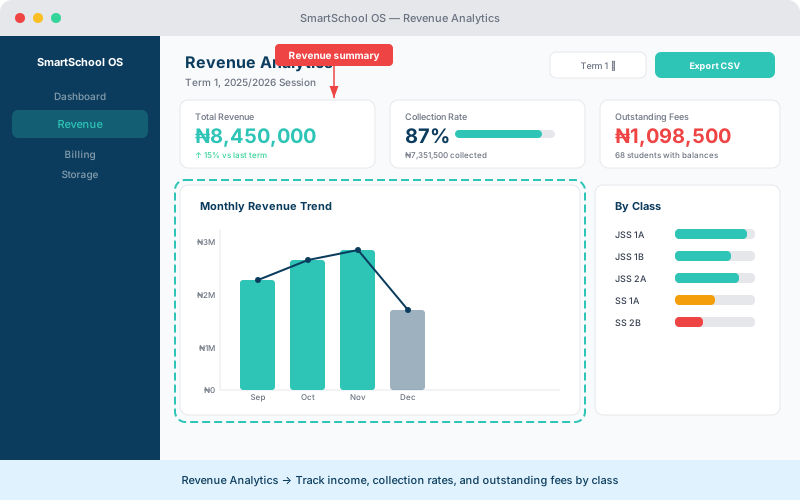
The analytics panel gives you a complete financial picture:
Total revenue
Cumulative income for the current session with term-by-term breakdown.
Collection rate
Percentage of expected fees actually received — track trends over time.
Outstanding fees
Total amount pending, broken down by class and student.
Revenue charts
Visual bar and line charts filterable by term, class, or date range.
SmartSchool OS helps you close the collection gap:
Compare revenue across terms or sessions to spot growth trends and seasonal patterns. The comparison view places two periods side by side with percentage change indicators.
💡 Tip
Use period comparison to prepare board reports — it clearly shows year-over-year fee collection improvement.
Export revenue data in two formats:
CSV export
Raw data for import into Excel, QuickBooks, or other accounting software.
PDF report
Formatted summary report suitable for board meetings and audits.